Feature
Apple Health, on your terms.
Connect Apple Health and Fond shows steps, energy burned, workouts, exercise minutes and more beside what you eat. Each kind has its own switch, and Fond reads only what you turn on. It writes the weigh-ins you log, and your meals and water only if you turn them on. Steps, energy and sleep stay on your iPhone.
 Coming soon to theApp Store
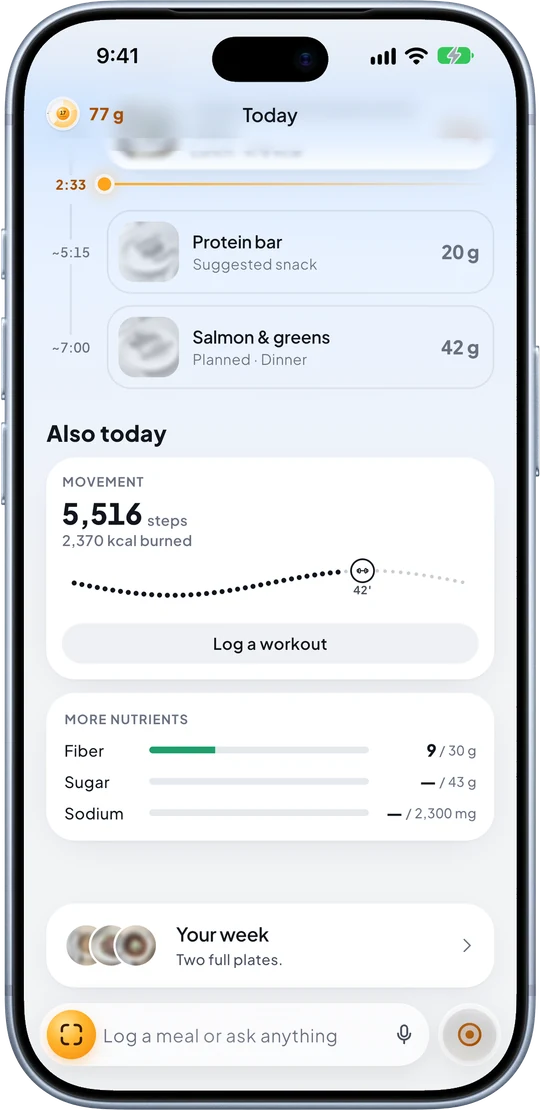
Connect Apple Health to see your day in one place: steps, energy burned, workouts, exercise minutes and more, next to what you eat. Fond reads only the Apple Health data you switch on and keeps it on your iPhone.
How to connect it
- Connect Apple Health when Fond offers it at the start, or later in Settings.
- Allow the kinds you want in Apple’s own sheet.
- Fine-tune in Fond. Each kind of Health data has its own switch: steps, energy burned, resting energy, exercise minutes, workouts, weight, body fat and lean mass, distance, flights climbed, resting heart rate and sleep.
Switching a kind off in Fond stops it reading that kind; to take the permission back, go to Health, then Sharing, then Apps.
What Fond reads, and where you see it
Steps show as a trail on Today, resting energy is added to active energy for the day’s total, and resting heart rate and sleep show in Activity. Workouts from Health are merged with the ones you log.
Activity: your day, week and month
Activity shows a day, a week or a month: steps, energy burned beside what you ate, exercise and workouts. On a day with a long walk, you can see the extra energy beside what you ate, without doing any sums.
Add burned calories to my goal adds active energy only, and it is off to start. Leave it off if you’d rather keep one steady calorie target; turn it on if you want a hard training day to give you more room.
What Fond writes
Fond writes the weigh-ins you log to Apple Health, and your meals and water if you turn them on, and you can turn it off anytime.
| To Health | When |
|---|---|
| Weigh-ins | Every weigh-in you log |
| Meals | Only after you switch them on |
| Water | Only after you switch it on |
Meals and water go to Health only after you switch them on, and Undo removes them from Health too.
Where Fond helps, and where it doesn’t
Seeing steps and energy next to your protein makes a day make sense: a long walk explains a hungry evening. Fond can only show what Health has, so without a Watch some kinds stay empty, and energy burned is always an estimate. When nothing measures your resting energy, Fond uses its own estimate and marks it as one. Steps, energy and sleep stay on your phone: never uploaded, never sent to the AI, never in analytics. Fond doesn’t diagnose anything from your heart rate or sleep; it only shows them.
Questions and answers
Does Fond send my Health data anywhere?
Steps, energy and sleep stay on your phone: never uploaded, never sent to the AI, never in analytics. Fond reads only the Apple Health data you switch on and keeps it on your iPhone.
If I delete a meal in Fond, does it leave Health too?
Meals and water go to Health only after you switch them on, and Undo removes them from Health too.
Do I need an Apple Watch?
No. Flights climbed come from your phone, and exercise minutes from a Watch. When nothing measures your resting energy, Fond uses its own estimate and marks it as one.
Sources
What this page says about Fond was checked against the app on .
Get Fond
Logging, barcode scans, food search, your plan and your progress are free.
Coming soon to theApp Store