Feature
What to eat next, sized to what’s left.
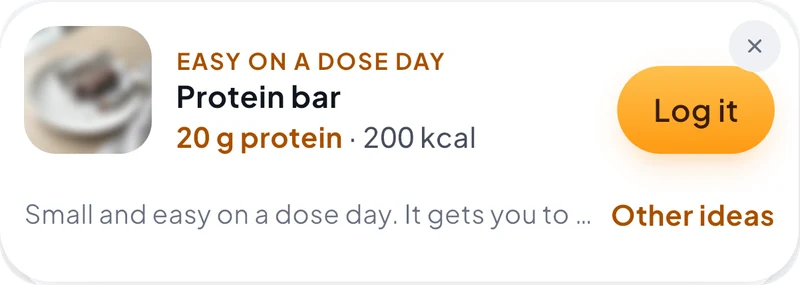
Up next is the card under your plate on Today. It suggests one food for your next meal, sized to what is left of your protein and calories, usually something you already eat, and says why it picked it. Tap Log it if you eat it, Plan it to keep it for later, Not now to set it aside, or Other ideas for more.
 Coming soon to theApp Store
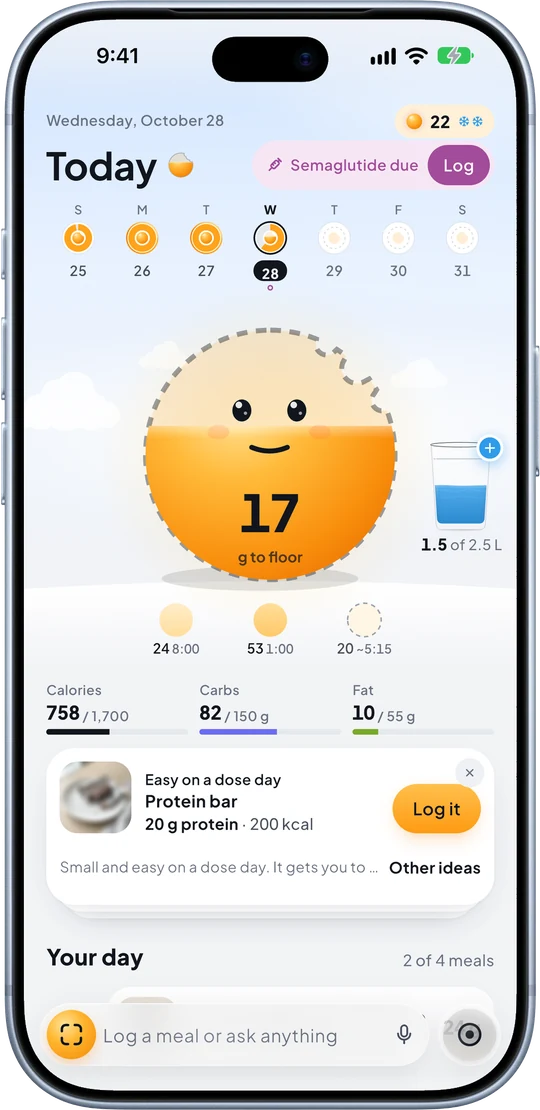
Knowing you have 40 g of protein left is useful. Knowing what to eat about it is more useful. Up next suggests your next meal, sized to what is left today, with one tap to log it.
How to use it
- Look under the plate. The card names one food with its protein and kcal, as in the screen above.
- Read the reason. Up next says why it picked a food, such as your usual meal or one you had recently.
- Log it, plan it or pass. Not now sets an idea aside, and Other ideas shows more choices. You can plan a meal ahead, and Up next shows it as planned.
- Want something different? Other ideas opens What to eat next, with more foods that fit and a button to ask for something new.
How it picks
Up next is ranked on your phone from your own history, so it works offline. Up next knows which meal is next, gathers candidates, removes what doesn’t fit, scores the rest and says why. Before your own history says anything, Up next offers starter foods, local ones first, such as cottage 5%, eggs, tuna, hummus and labneh.
The reasons Up next gives include your usual meal, the grams it fits, quick and high in protein, one you had recently, one you planned, and small and easy on a dose day.
| Reason on the card | What it means |
|---|---|
| Your usual lunch | A food you often eat at this meal |
| Fits the 30 g left | Sized to the protein you still need |
| Quick and high in protein | Easy to make, dense in protein |
| One you had recently | Something from your last few days |
| You planned it | A meal you planned earlier |
| Small and easy on a dose day | A lighter choice on a dose day |
Keeping track of your kitchen helps too. With food in your kitchen, Up next suggests what you can make.
How it changes with you
You choose how the app talks to you: Coach me, Just track, or Ease off the numbers. Coach me shows what to eat next and why, with a nudge when you’re behind. Just track shows your plate and your numbers, with no nudges and no streaks.
Where Fond helps, and where it doesn’t
Up next saves the “what now?” moment and usually suggests food you already like, because it learns from what you log. It is only as good as your history: in your first days it has little to go on, so it starts from everyday foods rather than yours. It doesn’t know what is in your fridge unless you tell it, and it never plans around a medical need; for that, a dietitian is the right person. Fond logs and informs. It doesn’t give medical or dosing advice.
Questions and answers
Does Up next use AI?
No. Up next is ranked on your phone from your own history, so it works offline. Ask is the AI part, for when you want something new.
Can I turn the suggestions off?
Just track shows your plate and your numbers, with no nudges and no streaks. Choose Just track and the plate stays, without suggestions.
What does it suggest on a dose day?
On a dose day, Up next suggests something small and easy. On those quieter days, Up next shows small foods ranked by protein per bite, not per meal.
Sources
What this page says about Fond was checked against the app on .
Get Fond
Logging, barcode scans, food search, your plan and your progress are free.
Coming soon to theApp Store