Feature
Snap a meal. See the protein.
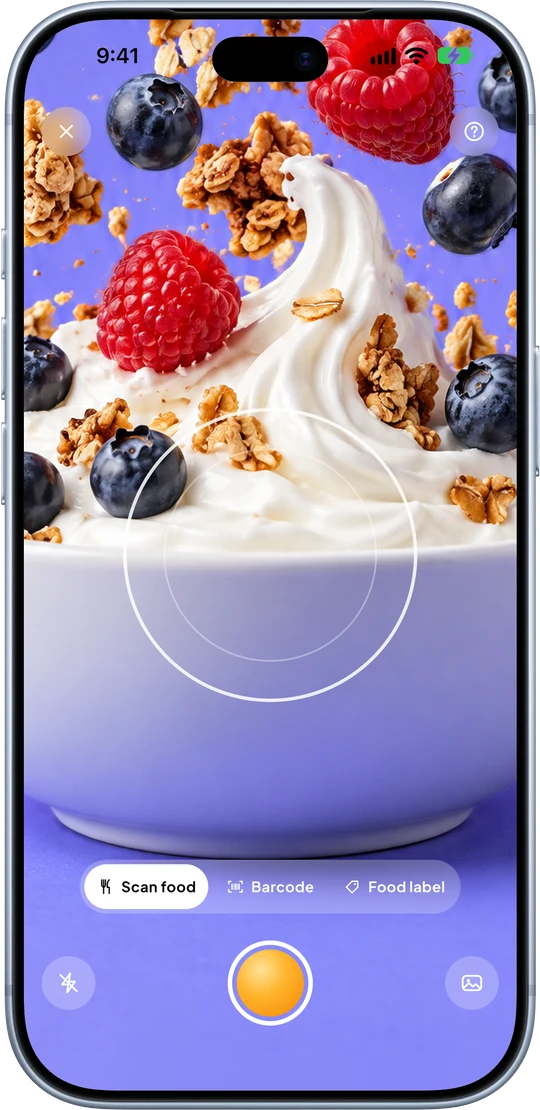
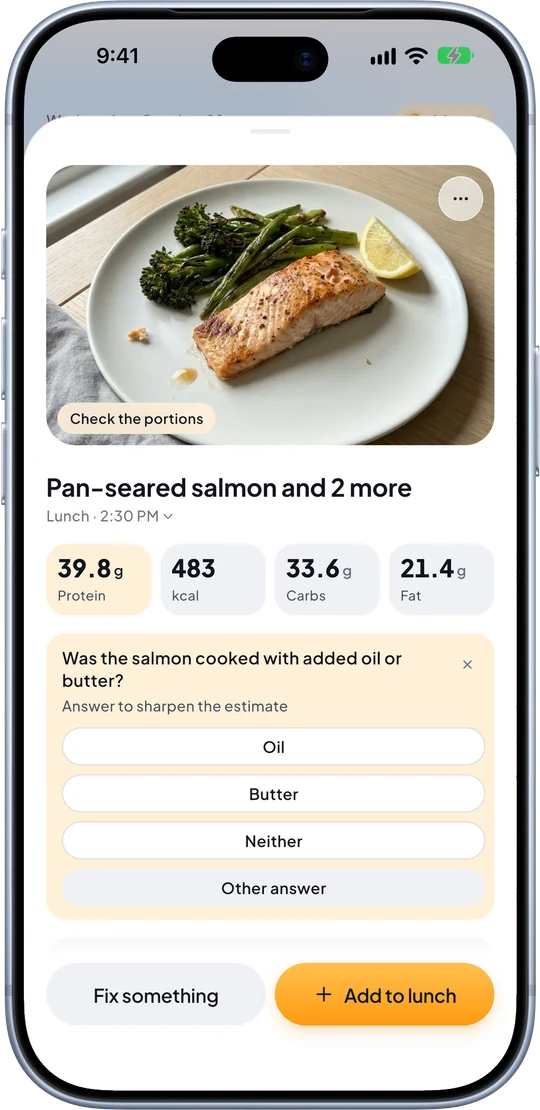
Point the camera at your plate and tap the yolk. Fond finds each food, gives it a portion and its protein, calories, carbs and fat, and asks one short question when the photo can’t tell. You check it, fix anything in a tap, and add it to your day.
 Coming soon to theApp Store
How it works
- Frame the plate. The camera’s ring is a plate: fill it with your meal. Add a second or third shot if part of it is hidden.
- Fond reads it. Each food comes back with a portion in grams and its protein, calories, carbs and fat.
- One question, if needed. When a photo can’t tell (was the salmon cooked in oil?), you get one question with answers to tap.
- Check and add. A portion is set on a ruler, with amounts to tap, and the food’s protein and kcal change as it moves. Or tap Fix something. Then add it, and the meal lands on today’s plate.
What happens to the photo
To judge amounts in a photo, Fond uses the plate as a ruler, along with cutlery, hands, cups and packaging. When food in a photo looks fried or glossy, Fond adds the cooking fat as its own item, marked as less certain. A dish that can’t be split into parts, such as shakshuka, lentil soup or a hummus plate, is read as one dish with its total weight.
The AI says what each food is and how much; its numbers are then looked up in your own foods, the labels you have read and food databases. A food with no match keeps the AI’s estimate, marked as an estimate. A food is matched to a database only when the names agree closely, and a different fat percentage or brand never matches, because a wrong match is worse than an honest estimate.
When one detail would change a meal’s protein or calories by more than about 20% (fried or grilled, whole or 1% milk, one egg or two), Fond asks one short question with 2 or 3 answers to tap.
Tips for a better read
| Do | Why |
|---|---|
| Shoot from above, the whole plate in the ring | Size is easiest to judge from above |
| Add a second shot for a deep bowl or a hidden side | Food under food is invisible in one photo |
| Keep a fork or your hand in the shot | Cutlery and hands help judge size |
| Answer the question | One detail, like oil or whole milk, can move the numbers a lot |
| Measure your usual bowls once | Your dishes give the photo a known size |
Other ways in
A meal can be snapped, said, or scanned from a barcode or a nutrition label. Packaged food? Scan the barcode, and Open Food Facts often has the product, sometimes with its photo. Know exactly what you ate? Search or say it. Want to log from the Lock Screen? See quick log.
Where Fond helps, and where it doesn’t
A photo is an estimate: oil, sauces and what’s under the rice are hard to see, which is why Fond asks and marks estimates as estimates. Weighing food is still the most exact way. Meal photos and words are read by OpenAI through Loopware’s relay, and AI reading can be turned off in Settings.
Questions and answers
How many photos can one meal have?
A meal can be snapped in up to 3 photos, and Fond shows protein, calories, carbs and fat for each food.
What if I’d rather not use AI?
Meal photos and words are read by OpenAI through Loopware’s relay, and AI reading can be turned off in Settings. Barcode scans and food search work without it.
Is anything logged before I check it?
A meal read from a photo waits for you to check it: nothing is logged until you tap Add. Typed or said meals are added as read.
Does a photo use my free AI uses?
Yes. Your first 5 AI uses (photo reads, typed or said meals and Ask) are free.
Sources
What this page says about Fond was checked against the app on .
Get Fond
Logging, barcode scans, food search, your plan and your progress are free.
Coming soon to theApp Store